Audit SharePoint External Sharing Without PowerShell
Find sharing links, external access and permission issues directly while working in SharePoint. SPO Scout helps administrators understand how content is being shared without building another PowerShell report.
Practical SharePoint administration directly in your browser. Free to start — Pro is $299/year per tenant, all admins included.
SharePoint Sharing Is Easy to Enable. Auditing It Is Harder.
Sharing a file takes one click. Working out, six months later, exactly who can still open it takes considerably more. External access arrives through several independent mechanisms — direct grants, group membership, sharing links, guest accounts — and each one lives on a different screen.
When an administrator is asked to review sharing, the questions tend to be these:
- Who currently has access to this library, folder or file?
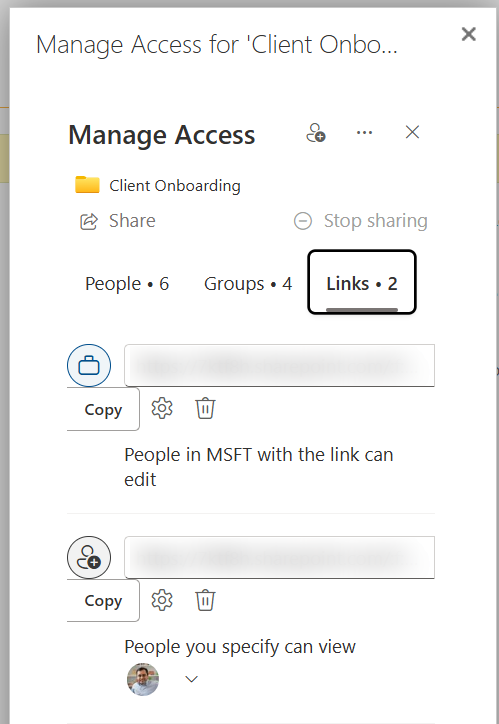
- Which items carry sharing links, and what kind of link is each one?
- Are there Anyone links — the kind that work without signing in?
- Is the access inherited from the site, or did this item break inheritance?
- Was access granted through a group, a sharing link or a direct permission?
- Can an external person who was given access months ago still reach the content?
- How do I collect that evidence without opening Manage access on every item?
SharePoint's own interfaces answer each of these for a single item: Manage access shows people, groups and links; the advanced permissions page shows inheritance; Site usage can export a site's sharing report. The difficulty is repetition. Investigating across sites, libraries, dozens of folders and hundreds of files means opening those screens again and again and keeping your own notes. SPO Scout is a faster workflow for that part — not a replacement for the admin center, and not a tenant-wide governance platform.
Review SharePoint Access and Sharing in One Workflow
Everything below runs in a side panel on the SharePoint site you have open, against the content your own account can see. Features marked Pro need a licence; the rest are on the Free tier.
See who has access
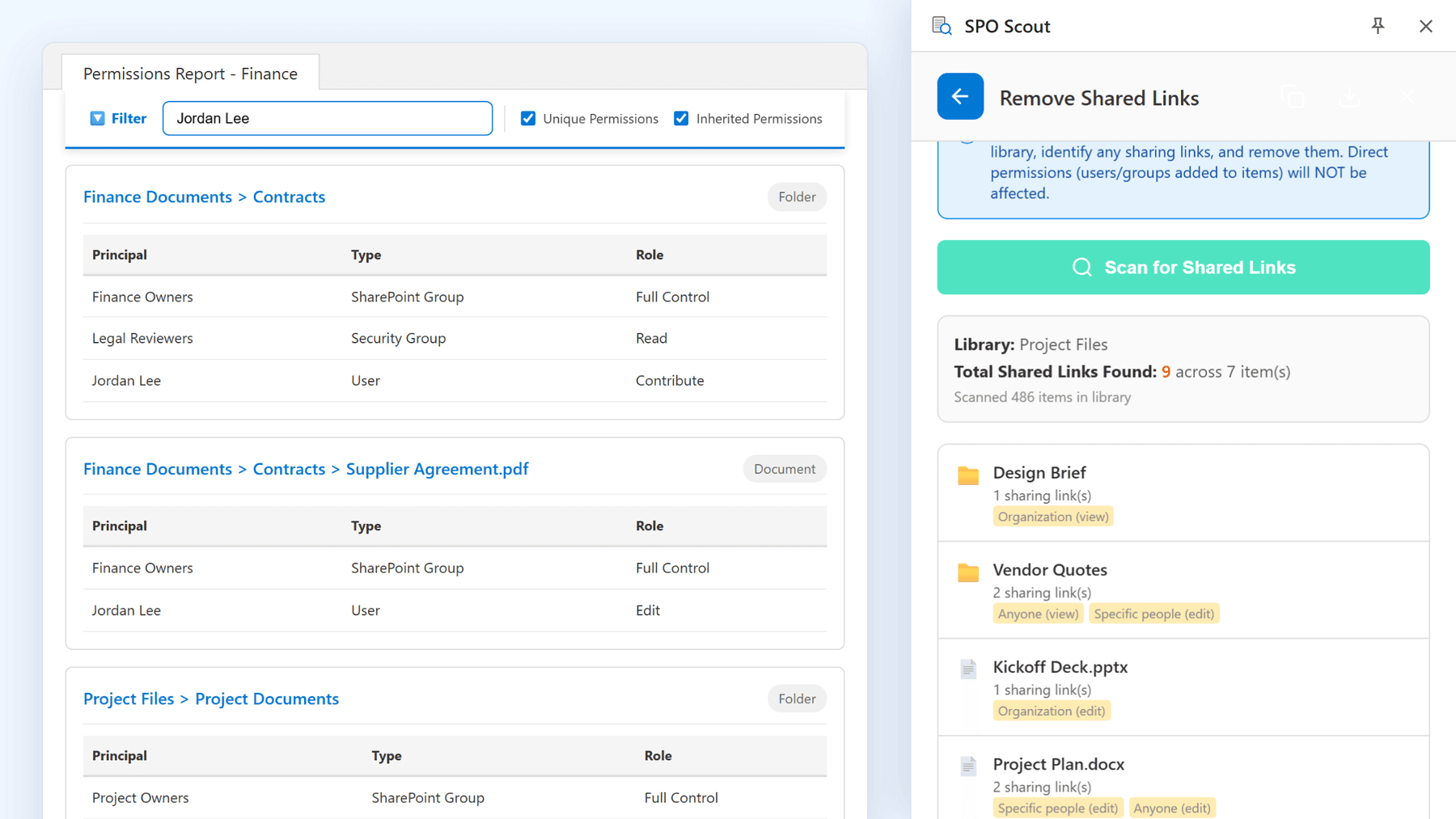
FreeThe permissions report lists the users and groups on every library, list, folder and file with unique permissions on the site you have open, with the permission level each holds.
Find unique permissions and broken inheritance
FreeLibraries, lists, folders and files that stopped inheriting from their parent are flagged, with their own role assignments shown.
Look up one user’s access
FreeCheck a single person’s direct grants and SharePoint-group membership across the current site and its libraries and lists.
Expand SharePoint groups
ProResolve SharePoint groups to the accounts inside them. Microsoft 365 and security groups remain single entries; their members are managed in Teams or the Microsoft 365 admin center.
Find sharing links
ProScan one library for items carrying sharing links. Each link is labelled Anyone, Organization, Specific people or Direct link, with view or edit where SharePoint reports it.
Remove sharing links in bulk
ProDelete every link the scan found in one step, after a confirmation that shows how many links and items are affected. Direct permissions on the items are left alone — only the links are removed.
Reset unique permissions to inherited
ProOnce you have decided an exception is no longer wanted, put the object back to inheriting from its parent.
Export the permissions report
ProDownload the permissions report as CSV, PDF or JSON for the audit file. The sharing-link scan is reviewed in the panel and does not have its own export.
The full permissions report is described on the SharePoint permissions report page, and every tool on features.
How It Works
SPO Scout works alongside SharePoint in your browser, using your existing Microsoft 365 session. You can investigate the current site, library, folder or file without switching to a separate administration platform or writing another PowerShell script.
Open SharePoint
Browse to the site or library you want to review, signed in as you normally are. That existing session is what SPO Scout uses.
Open SPO Scout
Click the extension icon. The side panel docks beside the SharePoint page rather than covering it.
Run the permission or sharing analysis
Run the permissions report for who-has-access and inheritance questions, or the shared-links scan (Pro) on a library to list the links on its items.
There is no Entra ID app registration, no Microsoft Graph permission and no tenant-wide admin consent. The extension calls the SharePoint REST API from the page you are signed in to, so it can never see more than your own account can.
Find SharePoint Sharing Links
Sharing links are the part of an access review most often missed, because they are not in the permission table. An item can look perfectly ordinary on the permissions page and still be reachable by anyone holding a URL. When you are troubleshooting access, the questions worth asking about links are:
- Which content has a sharing link?
- The scan lists each folder and file in the library that carries at least one created link, with the link count.
- What type of link is it?
- Anyone, Organization, Specific people or Direct link, with view or edit where SharePoint reports it. An Anyone (edit) link on a contracts folder reads very differently from a Specific people (view) link.
- Is the link still needed?
- The scan does not know who created a link or when, so that judgement stays with you. What it gives you is the list to judge against.
- Does the link explain unexpected access?
- Sharing links sit alongside the permission table rather than inside it. If the permissions report looks clean and someone still has access, a link is a likely reason.
- Is the item also using unique permissions?
- Sharing an item breaks its inheritance automatically, so items with links usually also appear in the permissions report as having unique permissions.
SPO Scout's shared-links scan (Pro) runs on one library at a time. It checks up to the first 2,000 items, stops after finding 500 items with links, and lists each item with its link types — including Anyone links. Once reviewed, you can remove every link it found in one step; direct permissions on those items are not touched.
Related reading: cleaning up 8,000 sharing links before a compliance audit.
Understand External Access
"External sharing" is really several things, and an audit has to separate them. A tenant can have no guest accounts at all and still be sharing a folder with the internet through an Anyone link. These are the routes access takes, and what SPO Scout shows for each on the site you have open:
Direct permissions
A person or group added straight to a site, library, folder or file. Shown in the permissions report where the object has unique permissions.
SharePoint group membership
Access through Members, Visitors, Owners or a custom SharePoint group. Pro expands these groups to the accounts inside them.
Microsoft 365 group membership
On a site connected to a Team, the Members and Owners groups contain the Microsoft 365 group. SPO Scout shows it as one entry; check its members in Teams or the Microsoft 365 admin center.
Sharing links
Anyone, Organization and Specific people links, each a grant in its own right. The shared-links scan (Pro) lists them per library.
Guest accounts
External identities invited into your directory. Entra ID and the Microsoft 365 admin center are the inventory for these; SPO Scout shows the access a guest holds on the current site but does not label accounts as guests.
Be clear about scope. SPO Scout reviews access on the current SharePoint site and its libraries; it is not a tenant-wide guest governance tool and does not read your directory. For the guest inventory, use Entra ID or the Microsoft 365 admin center. For the question "what can this account reach on this site, and how", run the report here.
Find Unique Permissions and Broken Inheritance
Sharing investigations lead to unique permissions more often than not. By default every library, folder and file inherits from the site above it, and sharing an item breaks that inheritance automatically — nobody chooses it, it is a side effect. So a file may appear unexpected simply because it stopped inheriting from its parent library or folder, and an unusual concentration of unique permissions in a library is often a map of where sharing has happened.
SPO Scout flags the libraries, lists, folders and files that have broken inheritance and shows their own role assignments, so the exceptions surface as a list rather than as a discovery during an audit. On Pro you can reset an object back to inherited once you have decided the exception is no longer wanted.
The SharePoint permissions report page covers inheritance, coverage and exports in detail, and how to find unique permissions in SharePoint walks through the native route step by step.
Audit Sharing Without Building Another PowerShell Script
PowerShell is excellent when you need automation or large-scale scripted administration — a monthly external-access export belongs in a script, not a browser tab. SPO Scout is designed for the moments when you need an answer now: who has access, where permissions differ, or how content is being shared, without building and maintaining another script.
Think of the options as a range. The native SharePoint UI is right for one item. PowerShell is right for repeatable, unattended work. Enterprise governance platforms are right for tenant-wide policy and migration. SPO Scout sits in the practical middle: interactive investigation of the site you are already looking at, with the ability to act on what you find in the same place.
A longer treatment of the trade-offs: audit SharePoint permissions without PowerShell.
Native SharePoint UI, PowerShell, or SPO Scout
These overlap but solve different problems. Native UI is good for individual-item inspection. PowerShell is excellent for automation and custom reporting. SPO Scout is designed for interactive browser-based investigation and reporting.
| Criterion | SharePoint Native UI | PowerShell | SPO Scout |
|---|---|---|---|
| Quick permission investigation | Good for one item at a time via Manage access | Fast once a script exists | Fast, interactive, no script |
| Unique permissions across a site | Lists the exceptions, not who holds them | Yes, with code | Yes, with principals and roles |
| Sharing-link review | Per item (Links tab); site CSV excludes Anyone links; tenant reports may need Advanced Management | Yes, with code | One library per scan, first 2,000 items (Pro) |
| Group expansion | Open each group separately | Yes, with code | SharePoint groups (Pro); Microsoft 365 groups stay single entries |
| Repeatable automation | No | Yes — this is where PowerShell wins | No, interactive by design |
| Browser-based workflow | Yes | No — console | Yes, in a side panel beside SharePoint |
| Exports | Site sharing report CSV | Anything you can code | Permissions report to CSV, PDF, JSON (Pro); link scan has no export |
| Scripting required | No | Yes | No |
Designed for SharePoint Administrators
SharePoint permission and sharing data is read through your existing signed-in session, analyzed in the browser and displayed there. It is not sent to SPO Scout servers. The only requests that leave your browser for us are the license checks and the optional feedback form, and neither carries SharePoint content. The extension does include management actions — removing links, resetting inheritance — so it is not read-only; every one of them runs with your own account's permissions and asks before it changes anything.
See how SPO Scout handles data & securitySimple Tenant Pricing
Free
$0
- 3 analyses per day
- Permission reports down to item level
- User permission lookup
- 5 most recent actions in history
SPO Scout Pro
$299 USD / tenant / year
- Unlimited analyses
- Sharing-link scan and bulk removal
- Group expansion — SharePoint groups resolved to their members
- Reset unique permissions back to inherited
- CSV, PDF and JSON export of the permissions report
One tenant. All your admins. $299/year.
SharePoint external sharing questions
- How do I audit external sharing in SharePoint?
- Check the mechanisms separately: tenant and site sharing settings, guest accounts in the directory, sharing links on items, direct permission grants, and group membership. SPO Scout covers the per-site part of that while you are in the browser — the permissions report shows who holds access and where inheritance is broken, and the shared-links scan (Pro) lists the links on a library's items. Tenant-wide settings and guest inventory stay in the SharePoint admin center and Entra ID.
- How can I find SharePoint sharing links?
- Natively, select an item, open Manage access and read the Links tab, one item at a time. With SPO Scout Pro, open the library and run the shared-links scan. It checks up to the first 2,000 items, stops after finding 500 items with links, and lists each item with its link types. Run it again on the next library if you need to continue.
- How do I find Anyone links in SharePoint?
- The shared-links scan labels each link by type, so Anyone (view) and Anyone (edit) links stand out in the results. Links of the flexible kind that allow anonymous access are also reported as Anyone rather than as Specific people. For every Anyone link across the tenant, use the SharePoint admin center's reporting, which may require SharePoint Advanced Management.
- How can I see who has access to a SharePoint file or folder?
- Run the permissions report on the site. Folders and files with unique permissions are listed with their assigned users and groups and the permission level each holds. Items that still inherit are marked as inherited rather than repeated. This is on the Free tier; expanding SharePoint groups to their members is Pro.
- Can I audit SharePoint permissions without PowerShell?
- Yes. SPO Scout reads permissions and sharing information through the SharePoint REST API in the browser session you are already signed in to. There are no modules to install, no app registration and no script to maintain. PowerShell remains the right choice for scheduled or custom reports.
- Does SPO Scout replace PowerShell?
- No. PowerShell is the right tool for automation, tenant-wide administration and repeatable scripted processes, and SPO Scout does not attempt any of that. It is for the moments when you are already in SharePoint and need an answer now.
- Does SPO Scout replace ShareGate or Syskit?
- No. SPO Scout is a lightweight SharePoint administration tool for quick audits, troubleshooting and browser-based workflows. Enterprise platforms such as ShareGate and Syskit serve broader migration, governance and tenant-wide management needs. Many teams use a browser tool alongside them.
- Does SPO Scout upload SharePoint content to its servers?
- No. Permission data, sharing-link information and report output are read, analyzed and rendered in your browser. The only requests that reach SPO Scout servers are the license checks and the optional feedback form, and neither carries SharePoint data. The security page lists each request and its contents.
- Can SPO Scout identify unique permissions?
- Yes. Libraries, lists, folders and files that have broken inheritance are flagged in the permissions report with their own role assignments, on the Free tier. Pro can reset an object back to inherited.
- Can I export SharePoint permission or sharing information?
- The permissions report exports to CSV, PDF and JSON on Pro. The shared-links scan is reviewed in the panel and does not have an export of its own. Free displays reports in the extension and keeps your five most recent actions in history.
- How much does it cost?
- Free runs three analyses a day. Pro is $299 USD per year for one Microsoft 365 tenant, with every admin in that tenant included.
See How Your SharePoint Content Is Being Shared
Open SharePoint, launch SPO Scout and investigate permissions and sharing without building another PowerShell report.
External sharing guides
Step-by-step walkthroughs for the audits this page is built around.
- How to Audit External Sharing in SharePoint Online →
The six kinds of SharePoint sharing to audit, and how SPO Scout lists shared items on a site and Anyone links in a library (Pro).
- How to Find Anyone Links in SharePoint Online →
Find Anyone links in a SharePoint library in one scan: SPO Scout lists items with sharing links and each link's type, and can remove them all (Pro).
- Everyone Except External Users in SharePoint: What It Means and What to Audit →
What Everyone except external users means, when it's fine and when it isn't, and how SPO Scout shows where it's granted on a site's libraries and files.
- How to Find Unique Permissions in SharePoint Online →
Find the libraries, lists, folders and files with unique permissions in a SharePoint site, and who has access to each, in one SPO Scout report.
- How to See Who Is Inside SharePoint Permission Groups →
See who is inside the SharePoint groups on a site's libraries, folders and files, not just group names: SPO Scout's expanded report lists members (Pro).