2 weeks → 4 hours
Permission audit
A healthcare estate audited by hand before each compliance review, rerun with SPO Scout permission analysis and export — an estimated $12,000 of billable time saved on that engagement.
How the audit was run →A browser extension for SharePoint Online admins: find broken inheritance, see who has access, and export the evidence with Pro, from a side panel inside SharePoint.
Runs locally in your browser · No SharePoint content sent to SPO Scout servers · How we handle data
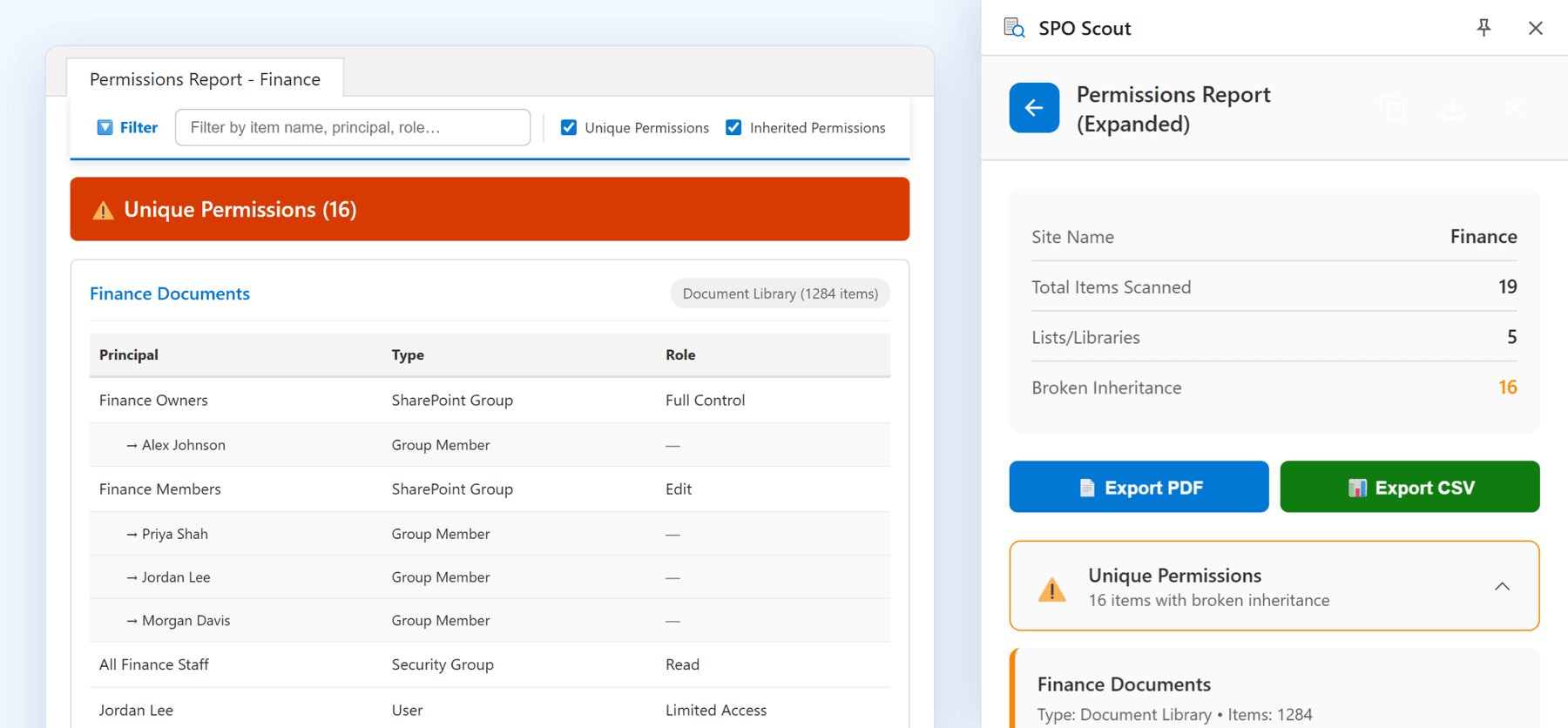
The answer is spread across inherited permissions, broken inheritance, SharePoint groups, Microsoft 365 groups, direct access and sharing links. SPO Scout brings that evidence together in the browser.
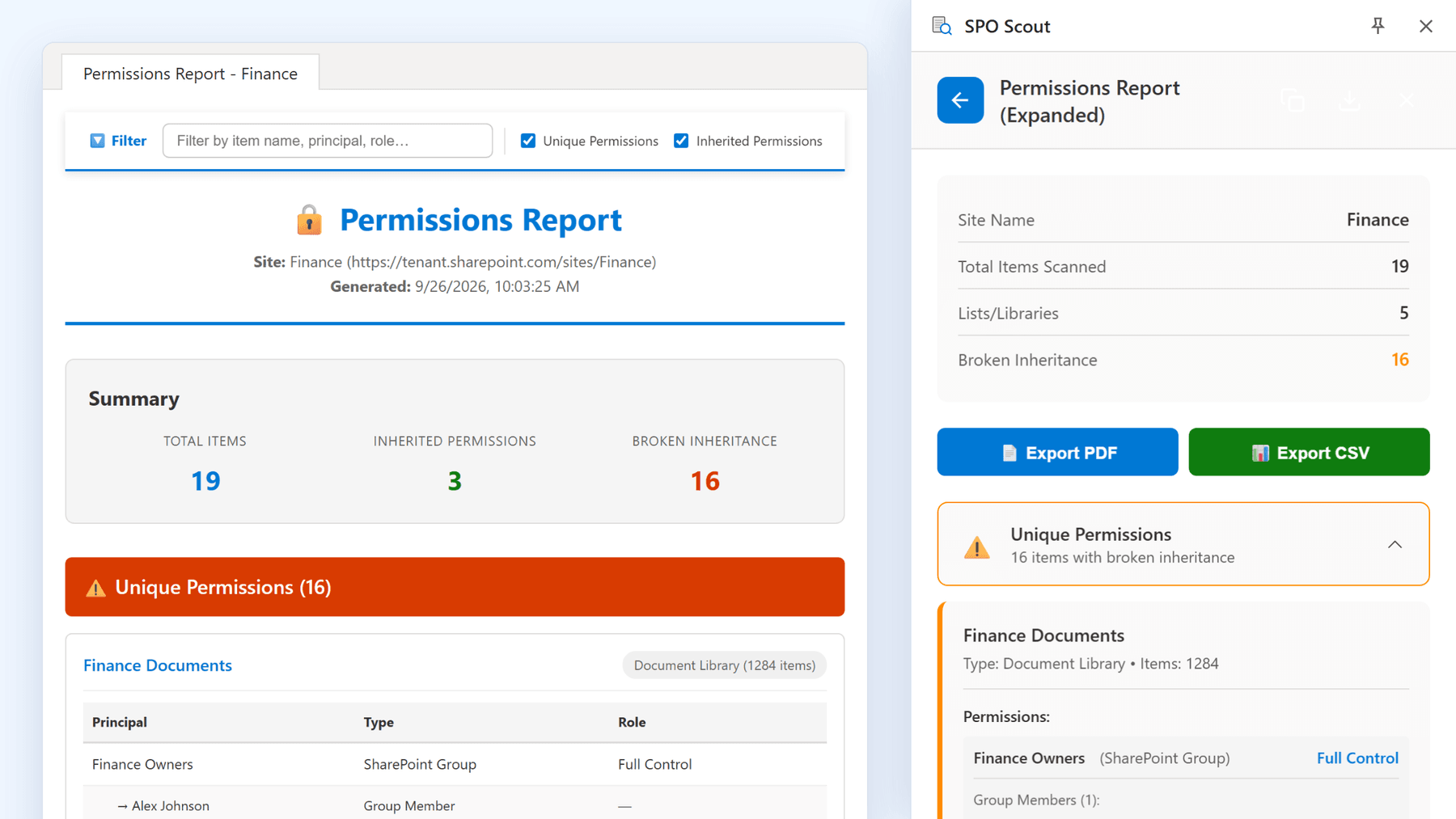
Report on a whole site, down to every folder and file with unique permissions. SharePoint groups are expanded to the people inside them (Pro), plus a per-user lookup for "what can this person reach?".
Objects whose inheritance has been broken are flagged, so unique permissions surface as a list. A separate scan finds sharing links, including "Anyone with the link" (Pro).
CSV for spreadsheets, PDF for the audit file, JSON if something else consumes it. (Pro)
These outcomes come from client engagements delivered by SPO Scout's founder, using the workflows the extension is built around.
A healthcare estate audited by hand before each compliance review, rerun with SPO Scout permission analysis and export — an estimated $12,000 of billable time saved on that engagement.
How the audit was run →"Anyone with the link" shares had accumulated unchecked at a financial services client. Discovery and bulk removal took about two hours, ahead of the audit deadline — avoiding an estimated $50,000 in potential regulatory exposure.
The sharing cleanup write-up →A migration left unique permissions scattered across the destination library. Analysis and a bulk reset to inherited restored it in roughly three hours.
The migration cleanup write-up →Based on real client engagements performed by the founder. Client names and identifying details are anonymized for confidentiality. Time and volume figures are measured; dollar figures are the client's own estimates of avoided cost, not audited amounts.
Permission audits, library insight, and the admin chores that used to need a script.
The permissions report, one person's access, sharing links, Library Analytics and Edit Metadata, on a demo site.
Runs in a side panel inside SharePoint — no scripts needed.
Every list and library in a site, which ones broke inheritance, and who holds what. Pro expands SharePoint groups to their members and exports PDF or CSV.
1 / 10
SPO Scout analyzes SharePoint information in your browser, using the session you are already signed in with. The SharePoint content it reads is not uploaded to SPO Scout servers.
No per-user pricing. One Pro license covers every administrator in your Microsoft 365 tenant.
Enough to audit a site and see whether it fits how you work
One Microsoft 365 tenant — every admin included
SPO Scout is a browser extension for SharePoint Online administrators. It runs in a side panel in Chrome, Edge, Brave and Opera, finds every library, list, folder and file in a site with unique permissions and shows who has access to each, compares libraries and exports reports (Pro), without PowerShell and without an app registration. Free to start; Pro is $299 a year per tenant.
Analysis runs locally in your browser: no SharePoint content or metadata is sent to SPO Scout's servers. The only requests to us are license checks (license key and tenant domain) and optional feedback.
Chrome, Edge, Brave and Opera. It installs from the Chrome Web Store, including in Edge.
Free gives you 3 analyses per day with core features. Pro unlocks unlimited analyses, exports, advanced tools, and covers your entire tenant.
One Pro license ($299/year) covers your entire Microsoft 365 tenant. All admins can use it — no per-user pricing.
No. SPO Scout provides a visual interface for everything — no scripting required.
Start free. No credit card required.