SharePoint Permissions Report
See who has access to SharePoint sites, libraries, folders and files. Identify unique permissions, expand groups, review sharing links and export results — directly from your browser, without PowerShell.
No PowerShell. No app registration. Free to start — Pro is $299/year per tenant, all admins included.
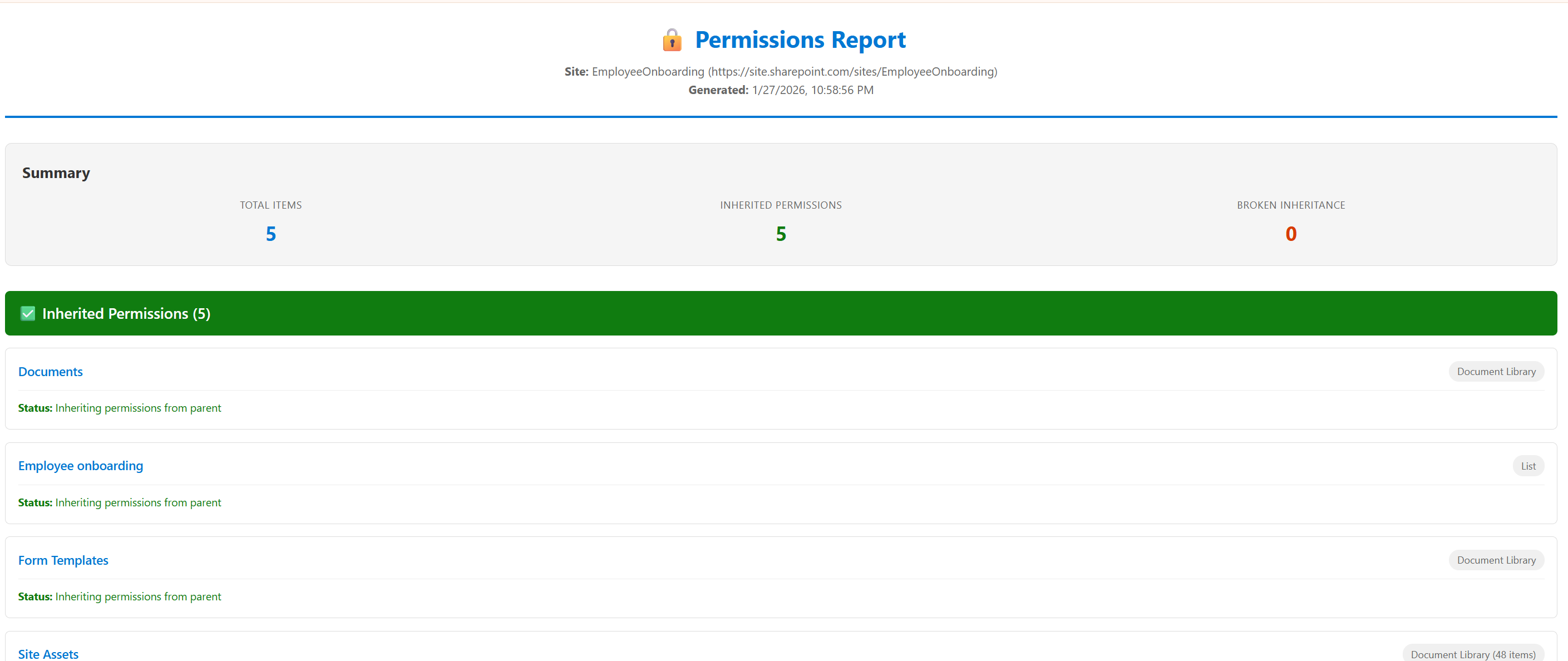
What you can do in the first minute
Install SPO Scout, open any SharePoint site you administer, and run a permission report in the side panel. Within about a minute you have a list of every user and group with access to that site or library, the permission level each one holds, and a flag on anything whose inheritance has been broken. The report already reaches individual folders and files with unique permissions. On Pro it also resolves each group to the people inside it, surfaces the sharing links published on items, and exports to CSV, PDF or JSON for the audit file. Nothing is installed on a server and nothing is scheduled — you point it at what you need to see and it answers.
What the report shows
- Who has access
- Every principal with a role assignment on the object — individual users, SharePoint groups, Microsoft 365 groups and security groups.
- What they can do
- The permission level behind the access: Full Control, Edit, Contribute, Read, or a custom role definition your tenant has defined.
- How they got it
- Whether access is inherited from the parent, granted directly on this object, or arrives through group membership.
- Inherited or unique
- Objects with broken inheritance are flagged, so the exceptions stand out instead of hiding in a long list.
- Group membership
- Groups are expanded to the accounts inside them, so "Marketing Members" resolves to the people it actually contains (Pro).
- Sharing links
- The sharing links published on items in the library, including the broad "Anyone with the link" type that most audits are hunting for.
- Scope
- Site, list, library, folder and file. Items with unique permissions are included on Free; expanding groups to their members is Pro.
How it works
Open the SharePoint site or library
Browse to it the way you normally would. You are already signed in, and that session is what SPO Scout uses.
Open SPO Scout in the side panel
Click the extension icon. It docks beside SharePoint rather than covering it, so you keep your bearings.
Run the permission analysis
Pick the scope you need — whole site, a single library, or down to individual items on Pro.
Review unique access and expand groups
Work through what broke inheritance and who is actually inside each group, instead of guessing from group names.
Export, or clean up in place
Export to CSV, PDF or JSON for the audit file. Or remove sharing links in bulk and reset unique permissions back to inherited (Pro).
Site, library, folder, file — four scopes, one question
SharePoint permissions cascade down a hierarchy, and an access problem can be introduced at any level of it. Reporting at the wrong scope is the usual reason an audit misses something.
Site
FreeWho can reach the site collection at all, through its Owners, Members and Visitors groups or through direct grants. The right starting point for an access review.
Library or list
FreeWhether a library still inherits from the site, and who has been added to it directly. This is where the first exceptions usually appear.
Folder
FreeA folder shared once for a project and never cleaned up is the classic finding. Broken inheritance at folder level is invisible from the site permissions page.
File
FreeIndividual documents shared with a person or a link, independently of everything above them.
Unique versus inherited permissions
By default every library, folder and file inherits its permissions from the site above it. Inheritance breaks the moment someone shares a single document, adds a person to one folder, or changes a library's permissions directly. SharePoint does this quietly and does not report on it.
Unique permissions are not a fault in themselves — sometimes a folder genuinely should be restricted. The problem is the ones nobody remembers creating. A contractor added to one folder in 2023 still has access in 2026, and no site-level report will ever show it. SPO Scout flags every object that has broken inheritance so those exceptions surface as a list rather than as a discovery during an audit. On Pro you can reset an object back to inherited once you have decided the exception is no longer wanted.
Group expansion
A permission report that stops at "Finance Members — Edit" has not answered the question. Whoever asked wants names. Group expansion (Pro) resolves SharePoint groups and Microsoft 365 groups to the accounts inside them, so the report you hand to a compliance officer lists people rather than containers.
This matters most where groups are nested or where a Microsoft 365 group backs a Team. Access granted through a Team's membership is easy to overlook when you are reading a SharePoint permissions page, because the SharePoint side only shows the group.
External users and sharing links
Sharing links sit alongside the permission model rather than inside it, which is why they are so often missed. SPO Scout surfaces the links published on items in a library — including the broad "Anyone with the link" type that does not require the recipient to sign in — and on Pro can remove them in bulk once you have decided which should go.
Microsoft does offer native sharing reports in the SharePoint admin center, and for a scheduled tenant-wide inventory those are the right tool. The difference is where you are standing: SPO Scout answers the question while you are already looking at the library, and lets you act on the answer in the same place. Use both.
Related reading: cleaning up 8,000 sharing links before a compliance audit.
Exporting the report
Pro exports to CSV for spreadsheet work, PDF for the audit file, and JSON if you are feeding another system. Exports are generated in the browser and saved by your browser's own download manager — the data does not pass through us on the way.
The Free tier displays reports in the extension and keeps your five most recent actions in history. It does not export. If the deliverable is a file for somebody else, that is what Pro is for.
Native SharePoint, PowerShell, or SPO Scout
These solve overlapping but genuinely different problems. PowerShell is not the wrong answer — it is the right answer for automation, and no browser extension replaces it there.
| Criterion | Native SharePoint | PowerShell / PnP | SPO Scout |
|---|---|---|---|
| Setup required | None | Install modules, authenticate, often register an app | Install a browser extension |
| Visual interface | Yes, one object at a time | No — console output | Yes, whole scope at once |
| Ad-hoc "who has access to this?" | Slow — click through each object | Fast once a script exists | Fast, no script needed |
| Recursive scan of a library | Not available | Yes | Yes |
| Export to CSV / PDF | Not for permissions | Yes, with code | Yes, built in (Pro) |
| Scheduled / unattended runs | No | Yes — this is where PowerShell wins | No, it is interactive by design |
| Custom logic and bespoke output | No | Yes — anything you can code | No, fixed report shapes |
| Works without scripting skills | Yes | No | Yes |
A longer comparison lives in SharePoint admin extension vs PowerShell, and the step-by-step guide is how to generate a SharePoint permissions report without PowerShell.
Where the permission data goes
Nowhere. Permission data is read from SharePoint through your existing signed-in session, analyzed in the browser and displayed there. It is not sent to SPO Scout servers, and there is no Entra ID app registration or tenant-wide admin consent involved — which also means the extension can never see more than your own account can.
See how SPO Scout handles data & securityPricing
Free
$0
- 3 analyses per day
- Site, library and item-level permission reports
- Basic user permission lookup
- 5 most recent actions in history
Pro
$299/year
- Unlimited analyses
- Group expansion — groups resolved to the people inside them
- Group membership expansion
- Bulk sharing-link removal and inheritance reset
- CSV, PDF and JSON export
One tenant. All your admins. $299/year.
SharePoint permission reporting questions
- How do I generate a SharePoint permissions report?
- Open the SharePoint site or library in your browser, open SPO Scout in the side panel, and run the permission analysis for the scope you need. The report lists every principal with access, the permission level behind it, and whether that access is inherited or unique. Exporting to CSV, PDF or JSON requires Pro.
- Can I audit SharePoint permissions without PowerShell?
- Yes. SPO Scout reads permissions through the SharePoint REST API in your existing browser session, so there are no modules to install, no authentication to configure and no script to maintain. PowerShell remains the better tool for scheduled or unattended reporting across a whole tenant.
- Can I see folder and file level permissions?
- Yes, on the Free tier. The report checks every folder and file whose inheritance has been broken and lists its role assignments. Resolving groups to the people inside them is the Pro part.
- Can SPO Scout show which items have unique permissions?
- Yes. Objects that have broken inheritance are flagged in the report, so you can see where the exceptions are rather than reading through every entry. Pro can also reset unique permissions back to inherited.
- Can it expand SharePoint and Microsoft 365 groups?
- Yes, with Pro. Group membership expansion resolves a group to the accounts inside it, so a report shows the people who actually have access rather than a group name.
- Can I export the report?
- Pro exports to CSV, PDF and JSON. The Free tier displays reports in the extension and keeps your five most recent actions in history, but does not export.
- Does SPO Scout upload my SharePoint data?
- No. Permission data is read, analyzed and rendered entirely in your browser. The only requests that leave your browser for our servers are licence validation and the optional feedback form, neither of which carries SharePoint data.
- Do I need tenant-wide admin consent?
- No. SPO Scout has no Entra ID app registration and requests no Microsoft Graph permissions. It uses the SharePoint session you are already signed in to, which also means it can never see more than your own account can.
- How much does it cost?
- The Free tier runs three analyses a day. Pro is $299 per year for one Microsoft 365 tenant, with every admin in that tenant included — there is no per-user pricing.
Run your first permission report today
Install free, open a SharePoint site you administer, and see who has access. No PowerShell, no app registration, no credit card.