SharePoint Admin Extension for Permissions, Reporting and Troubleshooting
SPO Scout is a browser extension for SharePoint Online administrators. It finds every library, list, folder and file in a site with unique permissions and shows who has access to each, compares libraries and handles common admin tasks from a side panel inside SharePoint, without writing PowerShell scripts.
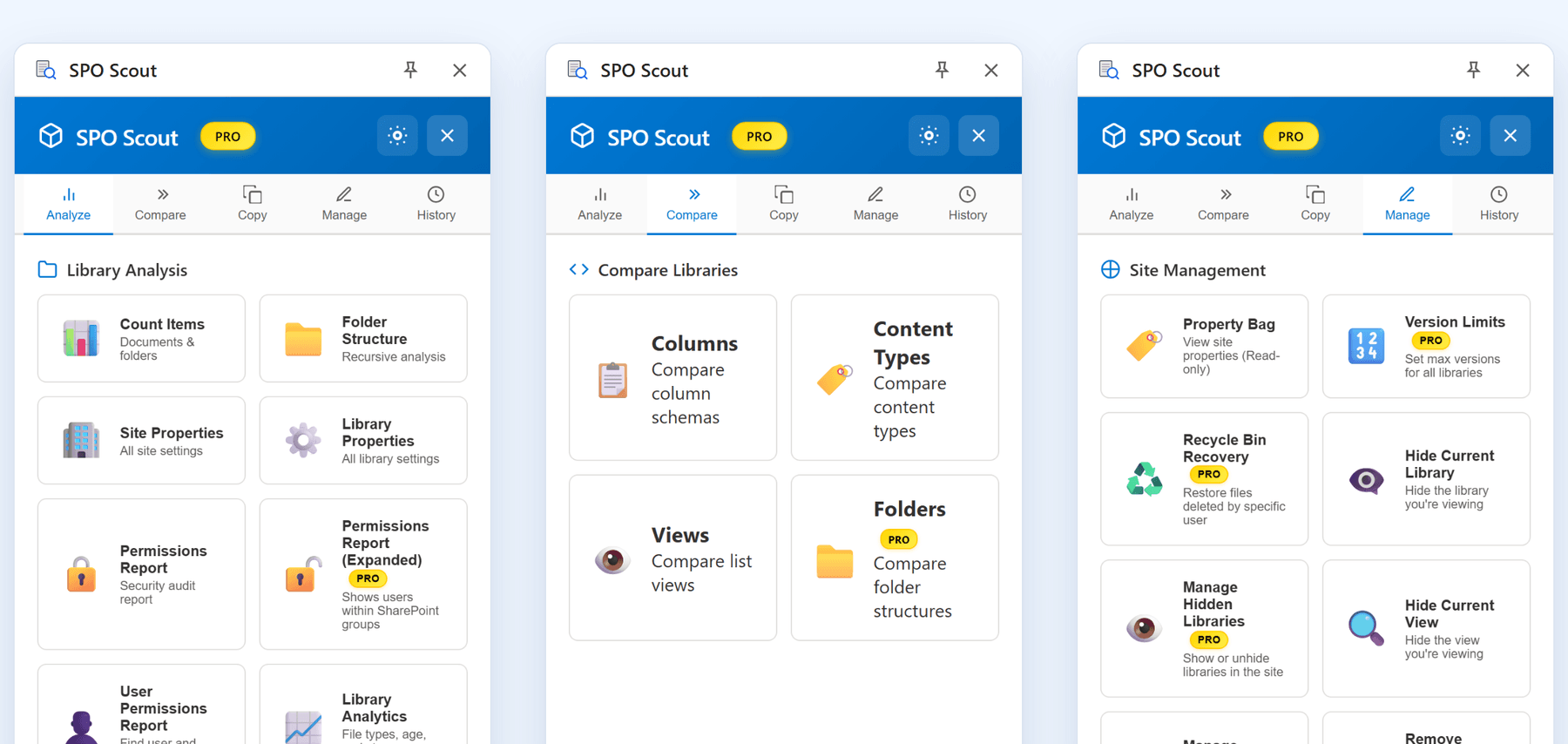
What does a SharePoint admin extension do?
A SharePoint admin extension is a browser extension that works on the SharePoint page you already have open. It reads the site through your existing sign-in and answers questions you would otherwise answer by clicking through settings pages or writing a one-off script: who has access to this library, which folders have broken inheritance, how two libraries differ, what is using the storage.
Because it runs in your browser with your own permissions, it can only see what you can see, and it works on the site in front of you. That makes it a tool for interactive checks and troubleshooting, not for scheduled or tenant-wide reporting.
Watch the 100-second tour
The permissions report, one person's access, sharing links, Library Analytics and Edit Metadata, on a demo site.
Chapters
What SPO Scout can help with
Each tool runs from the side panel on the site you have open. The free plan covers the reports; Pro adds group expansion, exports, sharing-link cleanup, bulk changes and copying.
Permission reports
FreeEvery library, list, folder and file in a site with unique permissions, with the users and groups on each, and which libraries and lists still inherit. Exporting the report to CSV, PDF or JSON is Pro.
SharePoint permissions reportUnique permissions and broken inheritance
FreeEvery folder and file whose inheritance is broken, listed with the users and groups that hold access, instead of a click-through of each library.
How to find unique permissionsOne person’s access
FreeLook up a user and see what they are granted directly or through SharePoint groups they are in, on the site and on each list and library. Access through Microsoft 365 or security groups, and on folders or files, is not checked.
How to check a user’s permissionsGroup members in the report
ProExpands each SharePoint group to the people in it, one level deep. Microsoft 365 and security groups appear as a single entry.
SharePoint group membership reportSharing links
ProScan a library for sharing links and see each link’s type (Anyone, organization, specific people or direct). It checks the first 2,000 items and removes every link it found in one action.
How to find Anyone linksLibrary comparison
Free + ProCompare the columns, content types and views of two libraries on the free plan. Comparing folder structures is Pro.
Validate a migration by comparing librariesStorage and version history
Free + ProBreak a library’s storage down by file type, folder and version history. The free plan runs one scan a day on the first 200 files, without version history.
Library storage breakdownCopy and recreate
ProCopy columns, views and pages to another site, or recreate a library’s structure somewhere else.
Copy a page to another siteBulk admin actions
ProEdit column values without changing Modified By, reset unique permissions to inherited, publish minor versions, set version limits and restore everything a given user deleted from the recycle bin.
All features
Is SPO Scout a good SharePoint extension for administrators?
SPO Scout is built for SharePoint Online administration, not general browser productivity. It suits admins, consultants and site owners who want quick, interactive permission audits and troubleshooting on the site in front of them, without building a script for each question.
It does not replace PowerShell for jobs that must run unattended, or a migration or governance platform when an organization needs tenant-wide reporting and policies. The comparison below shows where each one fits.
SPO Scout vs native SharePoint vs PowerShell
The same everyday jobs, done three ways. For the permissions report in detail, see the comparison on the SharePoint permissions report page.
| Job | Native SharePoint | PnP PowerShell | SPO Scout |
|---|---|---|---|
| See who has access to a library, folder or file with unique permissions | Yes, in its permission settings, one object at a time | Yes, with a script | Yes, for all of them in a site at once |
| See who has access through the site’s own permissions | Yes, on the site permissions page | Yes, with a script | Per person only, with the user lookup |
| Find every folder and file with unique permissions | Per library: “Show these items” lists the exceptions | Yes, with a script that walks the items | Yes, for a whole site (Free) |
| See the members of each SharePoint group | Open each group separately | Yes, with a script | Yes, in the report, one level deep (Pro) |
| Compare two libraries’ columns, content types and views | By hand, side by side | Yes, with a script | Yes (Free); folder structures on Pro |
| Copy columns, views or pages to another site | Mostly by hand (a new list can copy an existing list) | Yes, with PnP commands or templates | Yes (Pro) |
| Run on a schedule, unattended | No | Yes | No, interactive by design |
| Report across many sites or the whole tenant | Some admin center reports; most data access governance reports need SharePoint Advanced Management | Yes | No, one site at a time |
| Setup | None | Install the module and register your own Entra ID app | Install the extension; no app registration or admin consent |
| Cost | Included with Microsoft 365 | Free and open source | Free plan; Pro $299 a year per tenant |
When should I use something else?
- PowerShell or PnP for scheduled or unattended jobs, tenant-wide reports, and anything that needs custom logic or custom output.
- Microsoft’s own reports when a built-in report already answers the question, such as a site’s “Shared with external users” report, or data access governance reports if you have SharePoint Advanced Management.
- A migration or governance platform such as ShareGate or Syskit Point, when you need migrations, tenant-wide reporting, policies and workflows across many sites.
SPO Scout sits in the middle: interactive checks and fixes on the site in front of you, without writing a script for each task.
Compare the options: SharePoint browser extensions for adminsSharePoint permission reporting tools comparedSharePoint admin extension vs PowerShell, task by task
Security and data handling
SPO Scout reads SharePoint through your existing browser session and processes everything locally. No SharePoint content or metadata is sent to SPO Scout’s servers; the only requests to us are license checks and optional feedback. There is no Entra ID app registration and no admin consent, and it can never see more than your own account can.
How SPO Scout handles data →Pricing
Free: 3 analyses a day, permission reports down to item level, user lookup and library comparison.
Pro: $299 a year for one Microsoft 365 tenant, all admins included. Unlimited analyses, group expansion, exports, sharing-link cleanup, copying and bulk actions.
Compare Free and Pro →Frequently asked questions
- What is a SharePoint admin extension?
- A browser extension that works on the SharePoint page you have open and helps administrators check permissions, compare libraries and handle routine admin tasks with their existing sign-in, without a separate application or a script.
- Is there a browser extension for SharePoint administration?
- Yes, several. SPO Scout focuses on permissions and library administration; Syskit Site Evaluation and SP X-Ray also check access; others give quick links to admin pages or developer tools, such as SP Editor.
- Can a browser extension audit SharePoint permissions?
- Yes, within the limits of your own access. SPO Scout reads permission data through SharePoint’s REST API in your signed-in session. It finds every library, list, folder and file in a site with unique permissions and lists the users and groups on each; it does not list the site’s own permissions, which inheriting content follows.
- Does SPO Scout require PowerShell?
- No. Everything runs from the side panel; there is nothing to script and nothing to install besides the extension.
- Does SPO Scout need an Entra app registration or admin consent?
- No. It has no app registration and requests no Microsoft Graph permissions. It uses your existing SharePoint session, so it only sees what your account can see.
- Does SPO Scout replace PowerShell?
- No. PowerShell is the better tool for scheduled, unattended or tenant-wide jobs and for custom logic. SPO Scout covers the interactive checks you would otherwise script one at a time.
- Does SPO Scout replace ShareGate or Syskit?
- No. Those are platforms for migrations and tenant-wide governance. SPO Scout is a lightweight tool for interactive audits and fixes on one site at a time, and it can be used alongside them.
- Which browsers does SPO Scout work in?
- Chrome, Edge, Brave and Opera. It installs from the Chrome Web Store, including in Edge.
- How much does SPO Scout cost?
- The free plan costs nothing and includes 3 analyses a day. Pro is a one-time payment of $299 per Microsoft 365 tenant, valid for one year, and covers every admin in that tenant.
Try it on a site you manage
Install SPO Scout free and run your first permission report in a couple of minutes.