SharePoint Permission Inheritance: How Broken Inheritance Works
How SharePoint permission inheritance works, why broken inheritance piles up, and how SPO Scout shows the exceptions in a site with who has access to each.
Quick answer
In SharePoint, every library, folder and file takes its permissions from its parent unless someone breaks that link. An object with broken inheritance keeps its own copy of the permissions and stops receiving changes made above it. Over time those exceptions pile up, and a change at site level quietly does less than it appears to.
SPO Scout shows the libraries, lists, folders and files in a site that have stopped inheriting, with who has access to each, in one report, from the SharePoint page you're on. With Pro, it also resets a library's exceptions back to inheriting in one step.
What inheritance means
Permissions flow down a chain: site, then library or list, then folder, then file. Add someone to the site's Members group and they can edit every library, folder and file beneath it, because each one still takes its permissions from its parent.
The detail that causes the confusion: an object inherits from its immediate parent, not from the site. A file inherits from its folder, and if that folder has its own permissions, the file follows the folder:
Site: Marketing
 │   Members → Edit,  Visitors → Read
 │
 ├── Documents (library)        inherits
 │    ├── Campaigns (folder)    inherits
 │    └── Budgets (folder)      UNIQUE  ← chain cut here
 │         └── forecast.xlsx    inherits from Budgets, not from the site
 │
 └── Contracts (library)        UNIQUE
forecast.xlsx inherits, but what it inherits no longer reflects the site at all.
What breaking inheritance does
It happens in two steps, and only the first is visible:
- The object gets its own copy of the permissions in force at that moment. Nobody loses access, so it looks like nothing happened.
- It stops receiving changes from above. Take a group's access away at site level, or lower it from Edit to Read, and every object with its own permissions keeps the old access. Two things still flow through: group membership (add or remove someone from a group, and it applies everywhere the group is named) and the definition of each permission level.
Most broken inheritance isn't a decision anyone remembers making. Sharing a file or folder breaks its inheritance automatically, and each item shared on its own becomes its own exception (Manage permission scopes in SharePoint). Migrations reproduce per-folder permissions from the source, provisioning scripts apply them by design, and urgent one-off grants add the rest.
See every exception with SPO Scout
- Open any page of the site and open the SPO Scout side panel.
- Run the Permissions Report, or Permissions Report (Expanded) to see who is inside each SharePoint group (Pro).
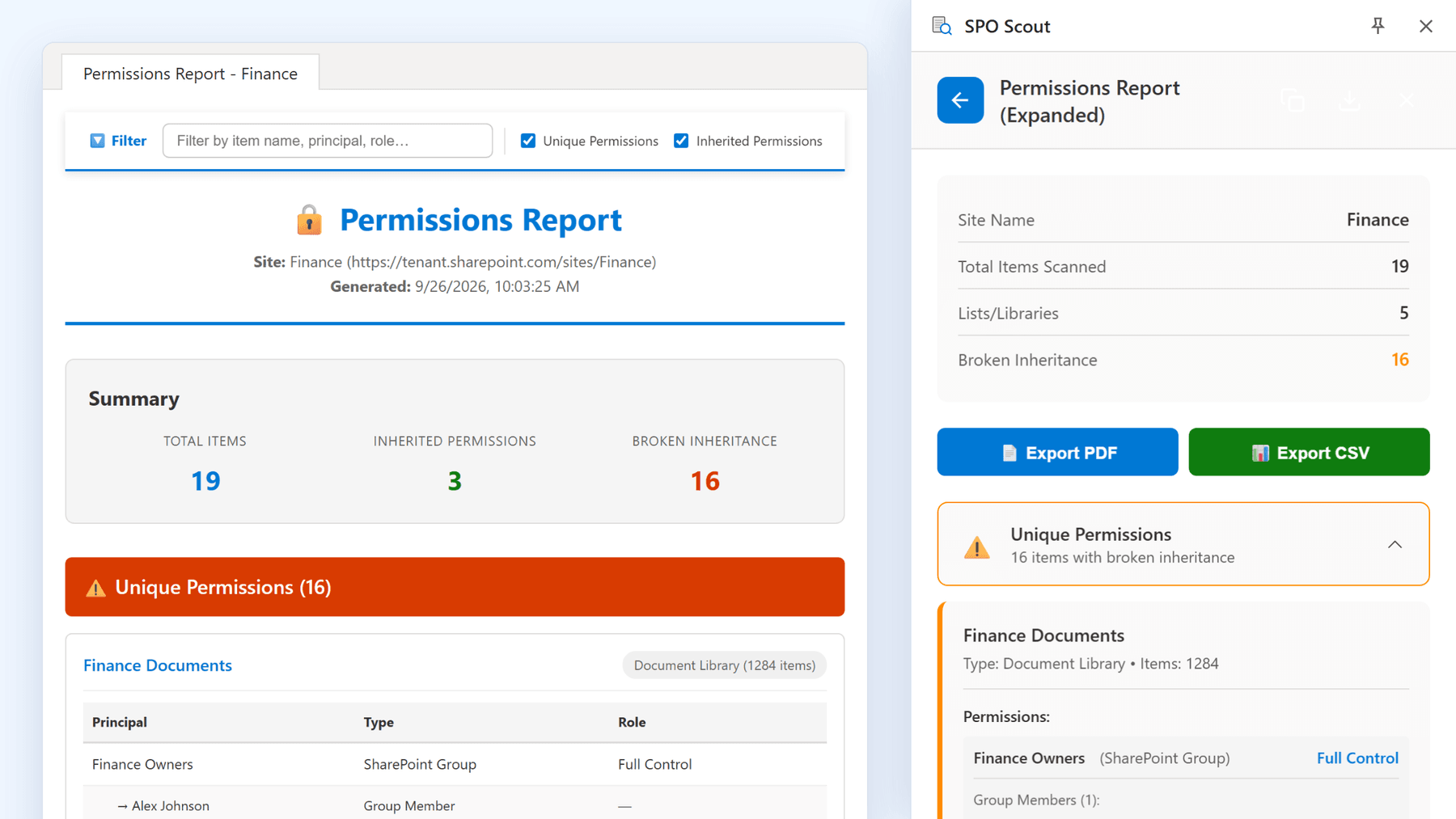
In one result you get:
- How many objects have broken inheritance, and which lists and libraries still inherit.
- Every folder and file with unique permissions, down to item level, across the whole site.
- Who has access to each exception: the users and groups, and their permission levels.
- The full report in its own tab (Pro), with a filter by name, so you can ask "where does this person hold access?", and export to PDF or CSV for your records.
It runs in your existing SharePoint session, with no app registration and no admin consent, and the report itself is free.
Restore inheritance in bulk (Pro)
Reset Permissions scans a library for items with unique permissions, lists them, and resets them all to inherit from the library in one step, after a confirmation that names the library and the number of items.
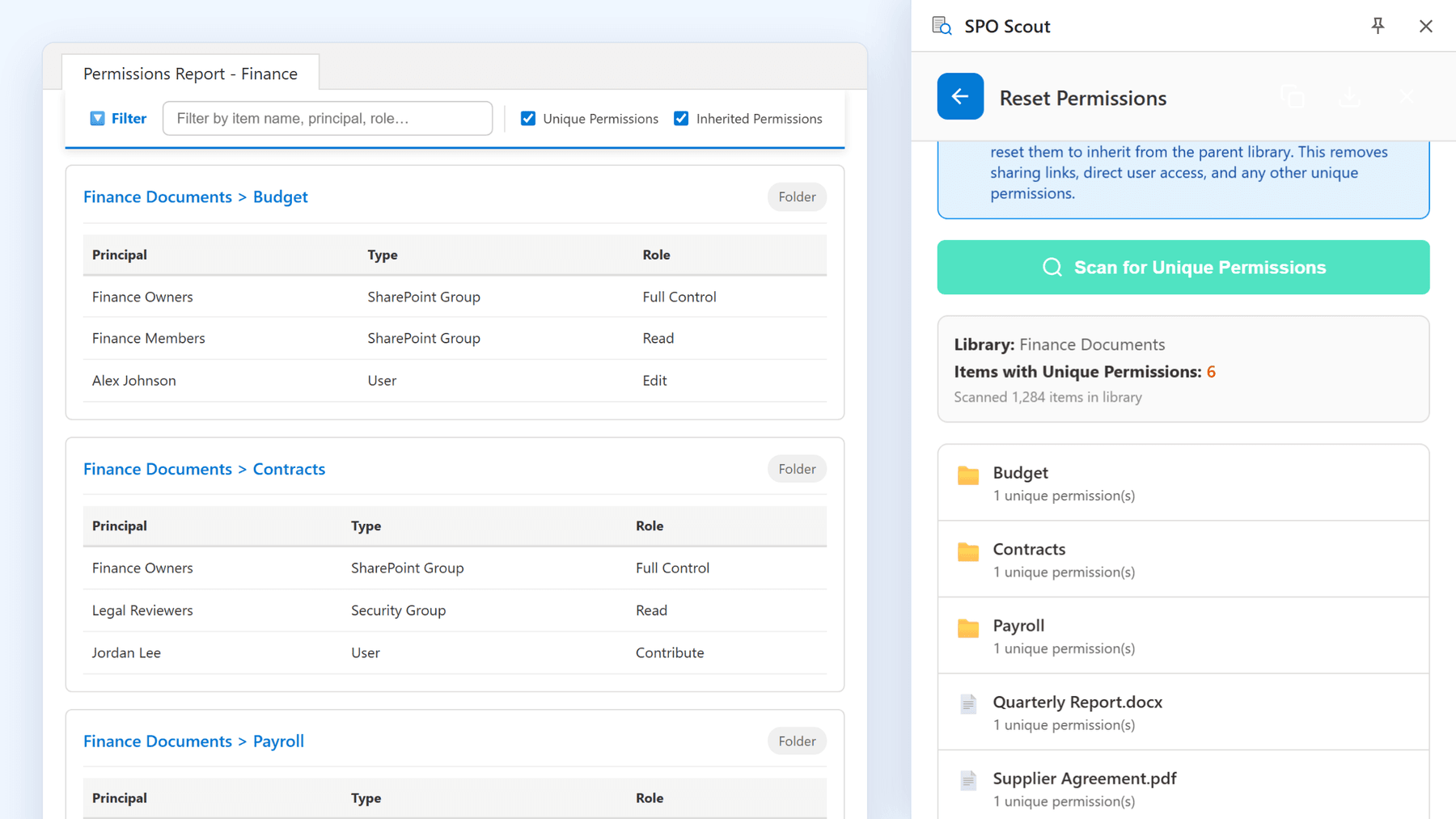
Restoring inheritance deserves care, because it can widen access as easily as narrow it. A folder restricted to three people, once it inherits again, is open to everyone with access to the library. Resetting also removes sharing links and direct grants on those items. So before a reset:
- Export the current permissions (Pro), so you have a record of what each item held.
- Find out why each exception exists. If nobody knows, that's a finding, not a green light.
- Leave genuinely restricted content alone: HR, payroll, legal matters, board material, client separation.
Without SPO Scout: what it takes
- One permissions page per object. SharePoint shows whether a library, folder or file inherits on that object's own permissions page, one object at a time.
- "Show these items" lists a library's exceptions without the people. Seeing who has access to each still means opening each item's permission settings in turn, then repeating that for every library in the site.
- Restoring inheritance is also per object, with "Delete unique permissions" on each item's page. Bulk changes mean writing PowerShell, with its own Entra ID app registration and an administrator's consent.
- Site usage can export a CSV of a site's sharing, internal and guest, but it leaves out Anyone links and shows SharePoint groups by name, not their members.
For one folder that's fine. For a site where sharing has created hundreds of exceptions, it's hours of clicking that SPO Scout replaces with one report.
What SPO Scout covers
- The whole site, down to item level, from any page of it, in its document libraries and custom lists. Other list types, such as Site Pages, picture libraries, calendars and task lists, aren't included. It doesn't read the site's own permission list or cover subsites, so check site-level grants on the site's Advanced permissions page.
- SharePoint groups expand one level (Pro). Microsoft 365 and security groups appear as one entry each.
- Free: the permissions report, up to 3 analyses a day. Pro: group expansion, export, and bulk reset.
Good habits for exceptions
- Grant to groups, not people. A group is a list you can review; a hundred individual grants are a hundred separate facts.
- Keep exceptions high up. One restricted library is one exception; the same restriction on two hundred files is two hundred.
- Write down why an exception exists: the object, the reason, the date, who decided.
- Review regularly. Exceptions accumulate silently, and they won't appear in any report you're not running.
Frequently asked questions
What does "this library has unique permissions" mean? It has its own copy of the permissions instead of taking them from the site. It won't receive future site-level changes, although changes to the membership of the groups it names still apply.
Does breaking inheritance remove anyone's access? No. It copies the permissions in force at that moment. The difference starts with the next change made above it.
Does restoring inheritance remove access? It can, and it can also grant it: the object's own permissions are replaced by the parent's. Compare both, and keep a record, before you reset.
Why did sharing a file break its inheritance? Sharing an individual file or folder is one of the ways SharePoint breaks inheritance automatically: the item gets its own permissions, with the new access added.
Can I see every object with broken inheritance in a site? Not in one native view with the people attached. SPO Scout's permissions report lists them, with who has access to each.
Is broken inheritance bad? No. Exceptions are how legitimate restrictions are expressed. The problem is undocumented accumulation, which is what regular reporting catches.
Related guides
- How to Find Unique Permissions in SharePoint Online →
Find the libraries, lists, folders and files with unique permissions in a SharePoint site, and who has access to each, in one SPO Scout report.
- SharePoint Permission Levels Explained →
SharePoint permission levels explained, from Full Control to Limited Access, and how SPO Scout shows the level on everything in a site with unique permissions.
- How to See Who Has Access to a SharePoint File →
See who can open a SharePoint file, and every file with its own permissions in a site, in one SPO Scout report. Group members and sharing links on Pro.