How to Copy a SharePoint Page to Another Site Faster with SPO Scout
SharePoint has page templates and site templates, but no simple modern authoring flow to copy a page from one site to another. Here's why cross-site page copying is still manual — and how SPO Scout helps save time.
TL;DR
There's no built-in SharePoint button that copies a modern page from one site to another. Microsoft gives you same-site page templates, site templates, and basic file copy — but none of those are the same as a proper cross-site page-copy workflow.
SPO Scout's Copy Page feature fills that gap. Instead of rebuilding sections, re-adding web parts, and copying content field by field, you do it from one panel in the browser.

Cross-site page copying in SharePoint is still harder than it should be — here's a faster way.
1. Why Copying Pages Across Sites Is Still Hard in SharePoint
Most SharePoint admins hit this wall at some point. You build a great modern page — sections, web parts, links, the works — and then someone asks you to put the same page on a different site. Sounds simple, right?
It's not. SharePoint doesn't have a "copy this page to another site" button. Nothing close to it.
Here's what Microsoft's own documentation says:
- Modern page templates are saved under "Saved on this site" — so they only show up on the site where you created them.
- Site templates don't merge content into existing sites. You get default content alongside whatever was already there.
- The old Save site as template option? Not supported for modern SharePoint Online sites.
So when you need the same page on a different site, you're mostly stuck doing it by hand.
2. What SharePoint Gives You Out of the Box
SharePoint isn't completely empty-handed here. There are a few features that get close.
A) Page templates
You can save a modern page as a template — and for creating similar pages on the same site, that works well. The catch is that those templates live under "Saved on this site." They don't follow you to a different site collection.
B) Site templates
Site templates help when you're spinning up a whole new site with a standard structure. But they're not designed for grabbing one page and dropping it somewhere else. When you apply a site template to an existing site, the old content doesn't merge — you just get new default content alongside it.
C) File copy behavior
SharePoint's "Copy to" and "Move to" work for documents, but pages aren't regular documents. Even for files, only the latest version gets copied. It's not the same as a page-copy workflow that preserves layout, web parts, and configuration.
The gap:
There are tools for templates and file movement, but nothing that just copies a finished modern page from Site A to Site B.
3. Why Manual Cross-Site Page Copying Wastes So Much Time
Without a built-in option, here's what most people end up doing:
- Open the source page in one tab
- Open the destination site in another tab
- Recreate each section by hand
- Re-add every web part, one by one
- Copy-paste the text content
- Fix all the links
- Re-upload or re-link images
- Spot-check formatting differences
- Publish, then test everything again
Fine if you do it once. Painful when it's the fifth time this month across different department sites, project sites, or client sites.
The real cost goes beyond time:
- Details get missed
- Formatting drifts between copies
- Links break or get forgotten
- Web parts end up half-configured
- Someone has to QA every copy
- Mistakes creep in that shouldn't be there
4. When Page Templates Help — and When They Don't
Page templates aren't useless — far from it. They're great when your team publishes similar pages on the same site and everyone needs a consistent starting point.
Where they fall short:
- The page you want already exists on a different site
- You need to copy a finished page, not start fresh from a blank template
- You're rolling out the same page across multiple sites quickly
- The goal is reuse, not rebuilding
SharePoint's reuse story works well within a site. Once you cross site boundaries, it falls apart pretty fast.
5. How SPO Scout Speeds Up the Process
SPO Scout has a Copy Page feature in the Copy tab. You load your source page, point it at the destination site, and it handles the cross-site copy for you — right from the browser.
The annoying part was never building the first page. It's having to rebuild the same thing on another site. That's what Copy Page skips.
What that means in practice:
- No more rebuilding sections from scratch
- No more flipping between two tabs and copy-pasting
- Fewer missed web parts and broken links
- Faster rollout when you need the same page on multiple sites
- Consistent output every time
If you're an admin, consultant, or power user managing pages across sites, that's hours back in your week.
6. See SPO Scout in Action
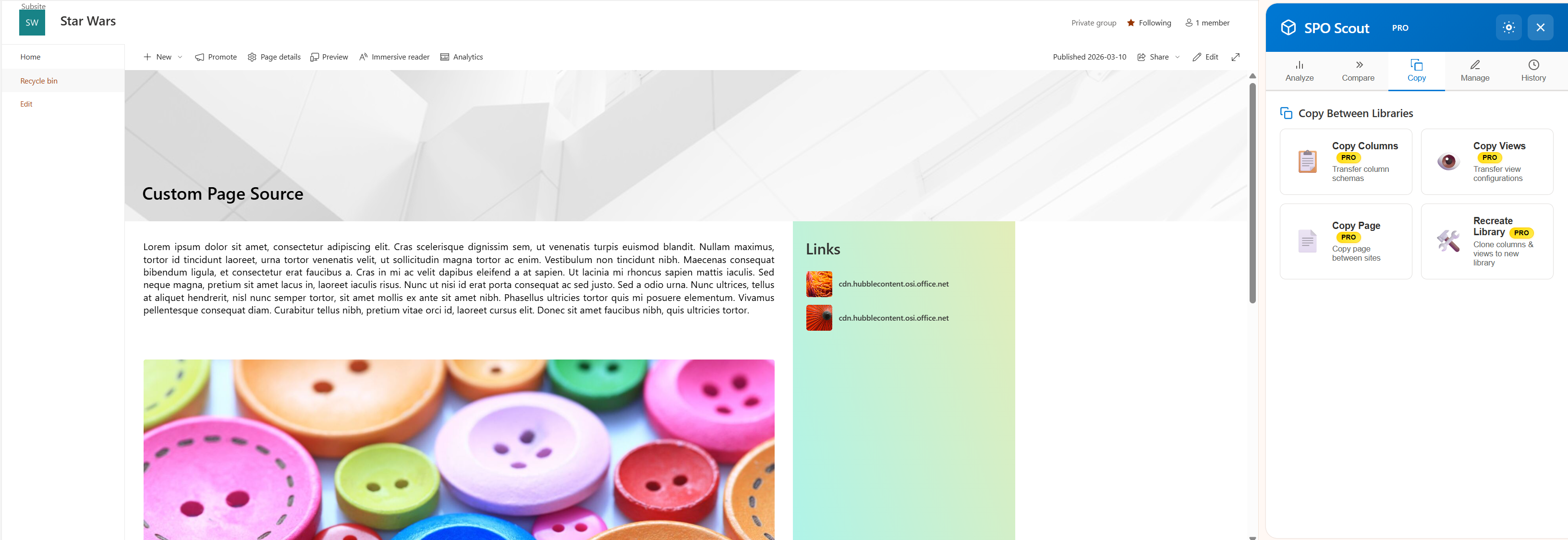
Step 1: Load the source page
Open the page you want to copy in SharePoint, then open SPO Scout. Go to the Copy tab and click Copy Page. It pulls in the page data right from where you're standing — no need to export anything or bounce between tabs.
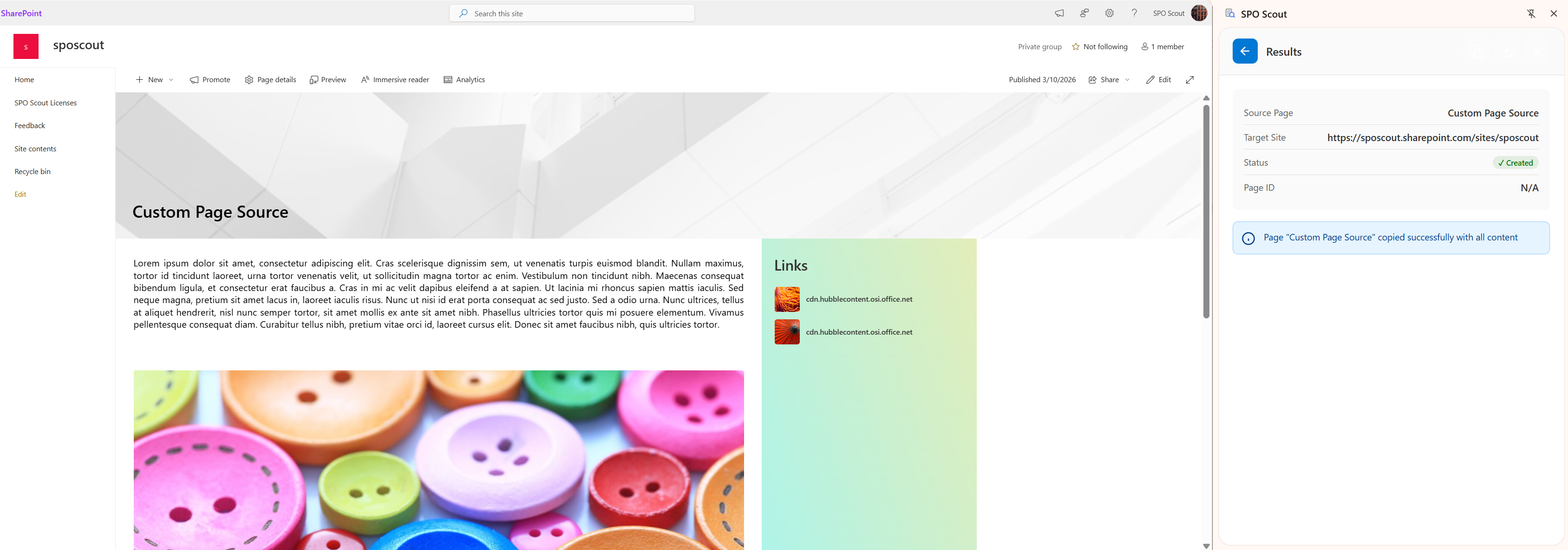
Step 2: Page created on the destination site
Once you enter the destination site URL and hit copy, SPO Scout creates the page on the target site. The results panel shows you exactly what was copied and where it landed.
7. Common Mistakes When Recreating Pages Across Sites
Mistake 1: Thinking page templates cover cross-site reuse
They don't. Templates stay on the site where you saved them. That's by design.
Mistake 2: Only copying the visible text
A page is more than words on screen. Sections, web part config, links, images — all of that needs to come along too.
Mistake 3: Ignoring that the destination site has different context
Site-relative links, list connections, and data sources may not exist on the target site. Always review after copying.
Mistake 4: Treating manual recreation as "just how it works"
It seems fine the first time. By the tenth time, it's a tax on your team's productivity.
Mistake 5: No standard process for cross-site copies
When everyone handles it differently, every copy job turns into its own mini-project. Pick a method and stick with it.
8. FAQ
Is there an out-of-the-box SharePoint button to copy a modern page directly to another site?
There is no simple documented modern authoring flow that works like a direct cross-site page-copy button. Microsoft's documentation instead points to same-site page templates, site templates, and generic file-copy behavior.
Can I save a page as a template?
Yes. Modern SharePoint supports saving a page as a template. But Microsoft documents those templates under "Saved on this site," which makes them primarily a same-site reuse feature.
Are site templates the same as page copy?
No. Site templates are for applying site structure and default content. Microsoft says existing content does not automatically merge with the new template.
Is "Save site as template" the answer for modern SharePoint Online?
No. Microsoft says that capability is not supported for modern SharePoint Online sites.
Why use a browser extension for this?
Because the main pain point is time. If you frequently recreate pages across sites, reducing manual steps can make the process much faster and more consistent.
9. Try This Workflow in 10 Minutes
Want to see the difference yourself? Try this:
- Pick a finished page on one of your sites
- Manually recreate it on a different site — time yourself
- Write down every step you had to repeat
- Now do the same thing with SPO Scout's Copy Page
- Compare the time and the result
Most people don't need convincing after that. The gap between "do it by hand" and "do it with Copy Page" is obvious the first time.
If you manage pages across multiple SharePoint sites regularly, this adds up fast.
Want to Spend Less Time Rebuilding SharePoint Pages by Hand?
Use SPO Scout to speed up cross-site page copying and reduce repetitive SharePoint work.
Copy Page is available with SPO Scout Pro • No credit card required to start